


GrassHOPPER G-code for 3d PRINTING - 10 HOURS
Online live sessions.
Combine the flexibility of Grasshopper with the precision of G-code. Aimed to generate custom G-code for controlling 3 axis FDM 3d printers, that could also be applied to other CNC machines as milling machines.
Next Course: Spots available!
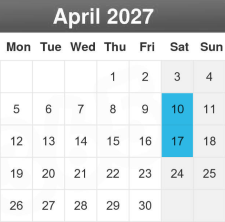
Dates: Saturdays, April 10th and 17th, 2027
Registration deadline: Monday, April 5th, 2027
Schedule: 3 – 8 pm (Madrid CEST)
Place: On-line live sessions, at our platform online.controlmad.com
There, you can access the live sessions with Zoom, and download files and documents.
Course code: G-code
COURSE INFO
Level > Basic / Intermediate*
There is a free webinar where you can find out more info about the course HERE
Also, You may check our pre-recorded course Intro to Grasshopper if you are new in Grasshopper.
Who is it for > > Professionals or students in engineering, architecture, design, 3D printing, FabLab managers and anyone related to creative field and CAD-CAM manufacturing.
Requirements > > Zoom app and Rhino for Windows or Mac. We will provide you files and information before starting the workshop. If you do not have Rhino, there is an evaluation version for 90 days.
Language > English. En español si todos los participantes lo hablaran.
Minimum number of registered students :7
We recommend having basic or intermediate knowledge of Grasshopper3D, with some understanding of data trees and their structure, as well as basic experience in FDM 3D printing.
This course is based on the instructor`s book Advanced 3D printing with Grasshopper: Clay and FDM, a recommended option as guide with many examples. Therefore this course is a good complement to it, that extends it and could solve some doubts.
PROGRAM
The course is scheduled in 6 modules, 3 per day:
Module #1 is an introduction to G-Code structure, firmware, FDM 3d printing and its configuration inside Grasshopper in its most common workflows.
Module #2 understands the main G orders in G-code and we will set a first file in Grasshopper for custom 3D printing using spiralized mode.
Module #3 is related to visualization, non-planar 3d printing with isocurves and the consequent variable flow.
Module #4 adds more complex features as bases, travels and retractions in Grasshopper.
Module #5 explains some study cases, as well as some time for questions and doubts of the attendance.
Module #6 explains some study cases, as well as some time for questions and doubts of the attendance.
Click the button above Descargar programa for more details.
FEE
- 150 euros. Early bird fee: 120 euros
ENROLLMENT
Enrollment and spot reservation are confirmed only after the student completes the registration and payment process (please click the button below PAY NOW). Registrations are processed in strict order of the emails received with valid proof of payment or receipt.
> Cash payment available at our facilities (by appointment only).
> Bank transfer. Please select this option in the payment process or click above the button Registration Policy for detailed information
> Credit – Debit Card (Secure e-commerce platform Stripe)
FAQ
- Are sessions recorded?
Sessions are live. We encourage you to attend to get your course certificate. Anyway, to give you time to practice, we will RECORD the sessions, available for two weeks from the starting date of the course.
- Do participants receive a certificate?
With an attendance rate of over 80%, participants will receive a certificate issued by ARTC and RhinoFabStudio
- How do I access the sessions?
A few days before the course starts, we will provide you with access to our online platform, where you can download materials, ask questions, join live Zoom sessions, and watch recorded sessions.
- What if I’m a Mac user?
Grasshopper is almost the same in Mac and Windows, so for this course it is not a problem.
- More questions?
Contact us via phone +34 91 539 33 66 , Whatsapp +34 674 254 635 or email formacion@controlmad.com.


